


Step 1 - Personal details
Step 2 - Email PIN
Step 3 - Authentication
Step 4 - Choose account
Step 5 - Payment details
Step 1 - Personal details
Step 2 - Email PIN
Step 3 - Authentication
Step 4 - Choose account
Step 5 - Payment details

Please enter the verification PIN sent to you via email
A 6-digit verification PIN has been sent to your email address
Step 1 - Personal details
Step 2 - Email PIN
Step 3 - Authentication
Step 4 - Choose account
Step 5 - Payment details

Congratulations! Your account has been registered with e-profound.
For security reasons we ask our users to set-up a 2-step verification process. This creates another layer of security around your data and protects your account. This new method requires users to have access to their login name and password as well as access to their mobile phone or email when logging onto the e-profound platform
Choose your second layer of security:
You have selected to receive your 2-step verification PIN via e-mail. The PIN will be sent to the e-mail address provided in step 1 (paul.smith@superstars.com). Verification methods can always be changed at a later date under your personal account settings.
For security reasons, a new PIN will provided every time you logon to e-profound.
You have selected the onetouch mobile authenticator, which is available for download from the app store of your choice. Just scan the respective QR code with your mobile phone or click on the icon below to start the download.

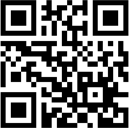


Once you have downloaded the app on your smartphone, click the 'Continue' button to start linking your account to your device. Linking your phone is easy and only requires you to enter a PIN or scan QR code, so we know it is you.

2-step verification method completed.
Great. Your e-mail account has been linked to your e-profound account. Starting from now you will be asked to authorise login attempts via entering a PIN at registration. With every login attempt a new PIN will generated and sent to you using the latest encryption technology.
We understand from personal experience that sometimes you may not have access to your e-mail accounts without the intervention of criminal minds. For these circumstances we have introduced the Recovery Code that allows you to safely access your account.
Recovery Code:
Please note down your recovery code and store in a safe location. Please note that we will not able to reproduce the recovery code at a later date. Failure to produce the recovery code will prevent you from accessing your account temporarily until we have verified your identity without doubt.
Link your account to the onetouch mobile authenticator
Great, you have downloaded the app and installed it your device. In a final step, we would like to ask you to choose now if you would like to link your phone by entering an automatically generated six digit PIN on your phone, or simply scan a QR code.
Congratulations! Your onetouch mobile authenticator has been linked to your account.
Great. Your account has been successfully linked to your smartphone. Starting from now you will be asked to authorise login attempt via your onetouch mobile authenticator to keep others out and your data safe.
We understand from personal experience that phones get lost, or sometimes you temporarily may not have access to your phone without the intervention of criminal minds. For these circumstances we have introduced the Recovery Code that allows you to safely access your account.
Recovery Code:
Please note down your recovery code and store in a safe location. Please note that we will not able to reproduce the recovery code at a later date. Failure to produce the recovery code will prevent you from accessing your account temporarily until we have verified your identity without doubt.
Step 1 - Personal details
Step 2 - Email PIN
Step 3 - Authentication
Step 4 - Choose account
Step 5 - Payment details
Please select your preferred account type
Free

Start your business

Free

10% project fee

10 bids per month

No additional bids

3 work samples

500MB work space

No team members

No skill tests

No attachments for proposals

Basic

Grow your earnings
EUR 10 per month *
8.45% project fee
20 bids per month

Add bids
10 work samples
1 GB work space
No team members

3 free skill tests

Attachments for proposals
Standard

Work with a team
EUR 20 per month *
7.45% project fee
50 bids per month
Add bids
25 work samples
1 GB work space

5 team members
5 free skill tests
Attachments for proposals
Premium

Go large
EUR 50 per month *
7.45% project fee
100 bids per month
Add bids
> 25 work samples
2 GB work space
Any team size
10 free skill tests
Attachments for proposals
Step 1 - Personal details
Step 2 - Email PIN
Step 3 - Authentication
Step 4 - Choose account
Step 5 - Payment details

Please enter your payment details
Lorem ipsum dolor sit amet, consectetur adipiscing elit. Aliquam vitae arcu nibh. Duis quam ligula, sollicitudin vitae tortor a, rhoncus ultrices elit. Vivamus quis dolor et enim vestibulum venenatis id ac magna. Cum sociis natoque penatibus et magnis dis parturient montes, nascetur ridiculus mus.Sed a nunc eu ante placerat pulvinar at vel nibh. Quisque lacinia imperdiet nisi nec cursus. Cras vel sem facilisis augue lobortis fermentum id finibus mauris.
First name is required. No spaces are allowed!
Last name is required. No spaces are allowed!
The email field must contain a valid email address!
Login name is required. Minimum 4 characters.
Address line 1 is required!
Postcode is required!
City is required!
You must select a country!
Password is required!
You need to select 3 security questions!
Please chek the "Terms and Conditions" chekbox!
Very weak password security
Weak password security
Middle password security
Strong password security
Terms and Conditions
Please chek the "Terms and Conditions" chekbox!